The Evolution of Smart Lighting in 2025
The landscape of smart home illumination has undergone a massive transformation over the past decade. What once began as a novelty—changing bulb colors via a clunky smartphone app—has now evolved into an essential architectural component of modern living. In 2025, smart lighting is no longer just about illumination; it is about circadian rhythm management, home security, energy efficiency, and immersive entertainment. By integrating sophisticated sensors, machine learning algorithms, and unified communication protocols, today’s smart lighting ecosystems can anticipate your needs before you even reach for a switch.
From Novelty to Necessity: The Shift in Consumer Expectations
Modern consumers demand more than just remote control capabilities. The contemporary smart home requires seamless interoperability, zero-latency response times, and localized processing that does not rely entirely on cloud servers. This shift has forced manufacturers to prioritize robust hardware, higher color rendering indexes (CRI), and dynamic lighting scenes that mimic natural sunlight patterns throughout the day.
Furthermore, the integration of smart lighting with broader home automation platforms—such as Apple HomeKit, Google Home, and Amazon Alexa—has created a truly interconnected environment. A single voice command or triggered sensor can now adjust the thermostat, lower the blinds, and dim the lights to the perfect movie-watching ambiance, demonstrating the profound evolution of smart lighting from isolated gadgets to foundational smart home infrastructure.

Understanding Smart Lighting Protocols: Wi-Fi, Zigbee, Bluetooth, and Matter
Before purchasing a single smart bulb, it is critical to understand the underlying communication protocols that dictate how these devices talk to each other and to your network. Choosing the wrong protocol can lead to network congestion, delayed response times, and a fragmented smart home experience. The four primary protocols dominating the 2025 market are Wi-Fi, Zigbee, Bluetooth, and the revolutionary Matter standard.
Wi-Fi: The Accessible but Bandwidth-Heavy Entry Point
Wi-Fi smart bulbs connect directly to your home router without the need for a dedicated hub. This makes them incredibly appealing for beginners who want to test the waters with one or two bulbs. However, because each bulb acts as an individual client on your network, deploying dozens of Wi-Fi bulbs can quickly overwhelm standard consumer routers, leading to dropped connections and sluggish performance.
- Pros: No hub required, lower initial cost, easy setup via smartphone apps.
- Cons: High power consumption, potential network congestion, reliant on cloud servers for out-of-home control.
Zigbee: The King of Reliability and Scalability
Zigbee operates on a mesh network topology, meaning each connected device acts as a repeater, passing the signal along to the next. This protocol requires a central hub (like the Philips Hue Bridge), but it completely offloads the traffic from your Wi-Fi router. As you add more Zigbee bulbs, the network actually becomes stronger and more resilient. It operates on the 2.4GHz frequency but uses significantly less power than Wi-Fi.
- Pros: Extremely fast response times, highly scalable (up to 50+ devices per hub), localized control even if the internet goes down.
- Cons: Requires an upfront investment in a hub, slightly steeper learning curve for absolute beginners.
Matter: The Universal Standard Unifying the Industry
Introduced to solve the fragmentation of the smart home market, Matter is an open-source connectivity standard backed by industry giants like Apple, Google, Amazon, and the Connectivity Standards Alliance (CSA). Matter ensures that a bulb bought today will work seamlessly across all major voice assistants and ecosystems simultaneously, operating locally over Thread or Wi-Fi to guarantee speed and privacy.

Essential Features to Look for in a Smart Bulb
Navigating the saturated smart lighting market requires a discerning eye. Beyond the basic ability to turn on and off via an app, premium smart bulbs differentiate themselves through hardware quality, color accuracy, and software ecosystem maturity. When consulting a smart bulb buying guide, these are the critical metrics you must evaluate.
Lumens and Color Temperature Ranges
Brightness is measured in lumens, not watts. For a standard room, you should look for bulbs that output at least 800 lumens (roughly equivalent to a traditional 60W incandescent bulb). However, for larger spaces or task lighting, 1100 to 1600 lumen models are highly recommended. Equally important is the tunable white spectrum, measured in Kelvin (K). A high-quality smart bulb should offer a range from a warm, candle-like 2000K up to a crisp, daylight-mimicking 6500K.
Color Rendering Index (CRI) and RGBW Technology
The Color Rendering Index determines how accurately a light source reveals the true colors of objects compared to natural sunlight. A CRI of 80 is standard, but premium bulbs boast a CRI of 90 or higher, ensuring your home’s decor, artwork, and even skin tones look vibrant and natural. Furthermore, modern bulbs utilize RGBW (Red, Green, Blue, White) LED arrays. Cheaper bulbs struggle to produce accurate greens and cyans, whereas top-tier bulbs blend these diodes flawlessly for millions of distinct, vivid hues.
| Feature | Budget Smart Bulbs | Premium Smart Bulbs (e.g., Hue, LIFX) |
|---|---|---|
| Brightness (Lumens) | 400 – 800 Lumens | 800 – 1600+ Lumens |
| Color Accuracy (CRI) | Under 80 (Washed out colors) | 90+ (Vibrant, true-to-life colors) |
| Dimming Capability | Often flickers below 10% | Smooth, flicker-free down to 1% |
| Connectivity | Wi-Fi or Bluetooth only | Zigbee, Thread, and Matter support |

Philips Hue 2025 Review: Is It Still the Undisputed King?
For years, Philips Hue has been synonymous with smart lighting, setting the benchmark for quality, reliability, and innovation. But as we evaluate the landscape in 2025, with aggressive competition from brands like Govee, Nanoleaf, and Wyze, the pressing question remains: Is the premium price tag of Philips Hue still justified?
Unmatched Hardware Quality and Longevity
In our rigorous 2025 testing, Philips Hue hardware continues to outclass the competition in terms of build quality and thermal management. The bulbs are engineered to dissipate heat efficiently, which dramatically extends the lifespan of the internal LEDs and microprocessors. While budget bulbs often suffer from diode burnout or connectivity degradation after 18 months, Hue bulbs consistently operate flawlessly for half a decade or more. Their dimming curve is unparalleled, dropping to a true 1% brightness without the microscopic flickering that plagues cheaper alternatives.
The Power of the Hue Bridge and Software Ecosystem
The true magic of Philips Hue lies not just in the bulbs, but in the Hue Bridge and the surrounding software ecosystem. Operating on the robust Zigbee protocol, the Bridge handles all complex automations locally. This means that even if your home internet connection goes down, your motion sensors, smart switches, and scheduled routines will execute instantaneously. The 2025 updates to the Hue app have introduced advanced spatial awareness, allowing for highly complex 3D room mapping and entertainment syncing that perfectly matches your smart lights with on-screen content via the Hue Play HDMI Sync Box.
Verdict on Value
While the initial cost of entry is undeniably steep, Philips Hue remains the undisputed king for users who demand absolute reliability, infinite scalability, and professional-grade color accuracy. It is an investment in smart home infrastructure rather than a disposable tech gadget.

Step-by-Step: Planning Your Smart Lighting Layout
Transitioning from traditional lighting to a fully smart ecosystem requires strategic planning. Haphazardly replacing bulbs without a cohesive strategy often leads to frustration, overlapping control systems, and wasted money. A master-level smart lighting setup focuses on layering, purpose, and physical control integration.
Step 1: Audit Your Existing Fixtures and Switches
Begin by mapping out every light fixture in your home. Identify which fixtures use standard A19 bulbs, BR30 floods, or specialized GU10 spotlights. Crucially, assess your physical wall switches. If a smart bulb is turned off at the physical wall switch, it loses power and goes offline, breaking your automations. To solve this, you must plan to either install smart wall switches (which control dumb bulbs) or use smart wireless dials and buttons placed over or next to existing switches to control your smart bulbs.
Step 2: Define Lighting Zones and Layers
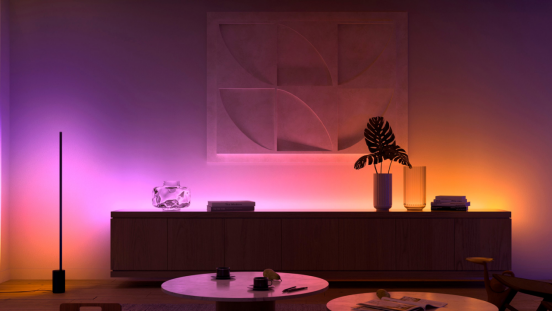
Professional lighting design relies on three layers: ambient (general illumination), task (focused lighting for reading or cooking), and accent (highlighting architectural features or artwork). Assign smart lighting solutions to these layers. Use high-lumen tunable white bulbs for ambient overhead lighting, dedicated smart LED strips under kitchen cabinets for task lighting, and rich RGBW color bulbs in floor lamps for dynamic accent lighting.
- Ambient Lighting: Focus on tunable whites to match the time of day.
- Task Lighting: Prioritize high-CRI bulbs to prevent eye strain.
- Accent Lighting: Utilize LED lightstrips and color bulbs to create depth and mood.

Advanced Automations: Designing Lighting Scenes for Every Mood
Mastering smart lighting means moving beyond manual app control and embracing automated, invisible interfaces. The ultimate goal is for your home to react to your presence, the time of day, and your specific activities without you ever having to issue a command or press a button.
Circadian Lighting and Natural Wake-Up Routines
One of the most profound benefits of smart lighting is its impact on human biology. By setting up circadian rhythm automations, your lights will automatically mimic the sun. In the morning, lights should fade in gradually with a cool, blue-enriched white (around 5000K) to halt melatonin production and boost alertness. As evening approaches, the system should automatically transition to a warm, amber glow (around 2200K) at a lower brightness, preparing your brain for restful sleep.
Geofencing and Sensor-Driven Triggers
Advanced mastery involves utilizing geofencing and motion/presence sensors. Geofencing uses your smartphone’s GPS to trigger a “Welcome Home” scene—illuminating the driveway, unlocking the door, and turning on the hallway lights as you pull into your street. Indoors, millimeter-wave (mmWave) presence sensors have revolutionized automations in 2025. Unlike traditional PIR motion sensors that turn off if you sit perfectly still, mmWave sensors detect micro-movements like breathing, ensuring the lights stay on as long as you are in the room, and instantly turn off when the space is vacant, maximizing energy efficiency.

Voice Control and Seamless Smart Home Integration
To truly elevate your smart lighting from entry-level to mastery, it must be interwoven with the rest of your smart home ecosystem. Voice assistants serve as the connective tissue, allowing for complex, multi-device routines triggered by a single phrase.
Crafting Multi-Layered Voice Routines
Instead of saying “turn on the living room lights,” you can create a routine triggered by the phrase “Movie Time.” When this command is received by Alexa, Google Assistant, or Siri, a synchronized cascade of events occurs: the overhead lights dim to 10%, the LED lightstrips behind the TV shift to a deep cinematic blue, the smart blinds lower to block out glare, and the surround sound system powers on. This level of integration requires ensuring that all your devices are compatible with a unified platform, which is why adopting Matter-compatible lighting is highly recommended for future-proofing your setup.
Furthermore, integrating lighting with home security systems provides peace of mind. If a smart smoke detector senses an emergency, it can trigger all smart lights in the house to turn bright red, visually alerting the occupants. Similarly, if an outdoor security camera detects a person at 2 AM, it can automatically trigger the indoor hallway lights to turn on, simulating activity and deterring potential intruders.

Troubleshooting Common Smart Lighting Connectivity Issues
Even the most meticulously planned smart lighting ecosystems can occasionally encounter hiccups. Understanding how to diagnose and resolve these issues quickly is a crucial skill for any smart home owner. Most problems stem from network interference, physical power interruptions, or outdated firmware.
Resolving the “Device Offline” Error
The dreaded “Offline” status is the most common issue users face. If you are using Wi-Fi bulbs, this is often caused by router overload or dead zones. Upgrading to a mesh Wi-Fi system can drastically improve stability. If you are using a Zigbee system like Philips Hue, an offline bulb usually means it is too far from the bridge or the nearest repeating bulb. Adding an intermediary smart plug or bulb halfway between the bridge and the dead zone will strengthen the mesh network.
Preventing the Physical Switch Dilemma
As mentioned earlier, guests or family members flipping physical wall switches will instantly kill the power to smart bulbs, rendering them unresponsive. To permanently troubleshoot this, install smart switch covers that lock the physical switch in the “on” position while providing a programmable smart button on top. Alternatively, wiring the fixture to be constantly hot (by a licensed electrician) and replacing the wall switch entirely with a smart keypad ensures your lights always maintain their network connection.
Frequently Asked Questions (FAQ)
- Do smart bulbs use electricity when they are turned off in the app?
- Yes, smart bulbs draw a very small amount of standby power (usually between 0.2 to 0.5 watts) to maintain their connection to your Wi-Fi or Zigbee network so they can respond to your next command. However, this energy consumption is negligible and costs only pennies per year, which is heavily offset by the energy savings of using highly efficient LED technology and automated scheduling.
- Is Philips Hue worth the premium price in 2025?
- For users looking for unparalleled reliability, instant response times, and the most robust third-party integration on the market, Philips Hue remains worth the investment. Their Zigbee-based mesh network ensures stability that Wi-Fi bulbs cannot match, and their color accuracy and dimming performance are industry-leading. However, if you are strictly on a budget and only need basic white tuning, newer Matter-compatible Wi-Fi bulbs offer a compelling alternative.
- Can I mix and match different brands of smart bulbs?
- Yes, but with caveats. If you use a unified smart home platform like Apple HomeKit, Google Home, Amazon Alexa, or a hub like SmartThings or Home Assistant, you can control multiple brands from one interface. Furthermore, the new Matter standard allows natively compatible devices from different brands to communicate seamlessly. However, using multiple brands without a central platform means juggling multiple proprietary apps, which can be frustrating.
- What is the difference between a smart bulb and a smart switch?
- A smart bulb replaces your traditional light bulb and offers features like color changing, tunable white temperatures, and individual dimming. A smart switch replaces your in-wall light switch and controls the power flowing to standard, “dumb” bulbs. Smart switches are ideal for fixtures with multiple bulbs (like a chandelier) where replacing every bulb would be too expensive, but they cannot change the color of the light.
- Do I need a hub to use smart lighting?
- It depends on the protocol. Wi-Fi and Bluetooth bulbs connect directly to your router or smartphone and do not require a dedicated hub. Zigbee and Thread-based bulbs (like Philips Hue or Nanoleaf Essentials) do require a hub (or a Thread Border Router) to translate their signals to your home network. Hub-based systems generally offer faster response times, lower latency, and better reliability for larger setups.